EDI and Acumatica: What It Is, Who Needs It, and How Integrated EDI Works
Learn how EDI works with Acumatica, who needs it, and how integrated EDI can automate purchase orders, acknowledgments, shipping notices, invoices, and other critical business transactions.
EDI Is Still One of the Most Important Connections to Your ERP
For many manufacturers, distributors, wholesalers, and suppliers, EDI isn't optional. It's simply part of doing business with major customers, retailers, distributors, and other trading partners.
A new customer may tell you they require EDI before they can begin sending orders. An existing customer may introduce new transaction requirements. Or your business may have reached the point where manually entering orders from an EDI portal into your ERP is creating too much work, too many opportunities for errors, and too little visibility.
That's where integrated EDI becomes important.
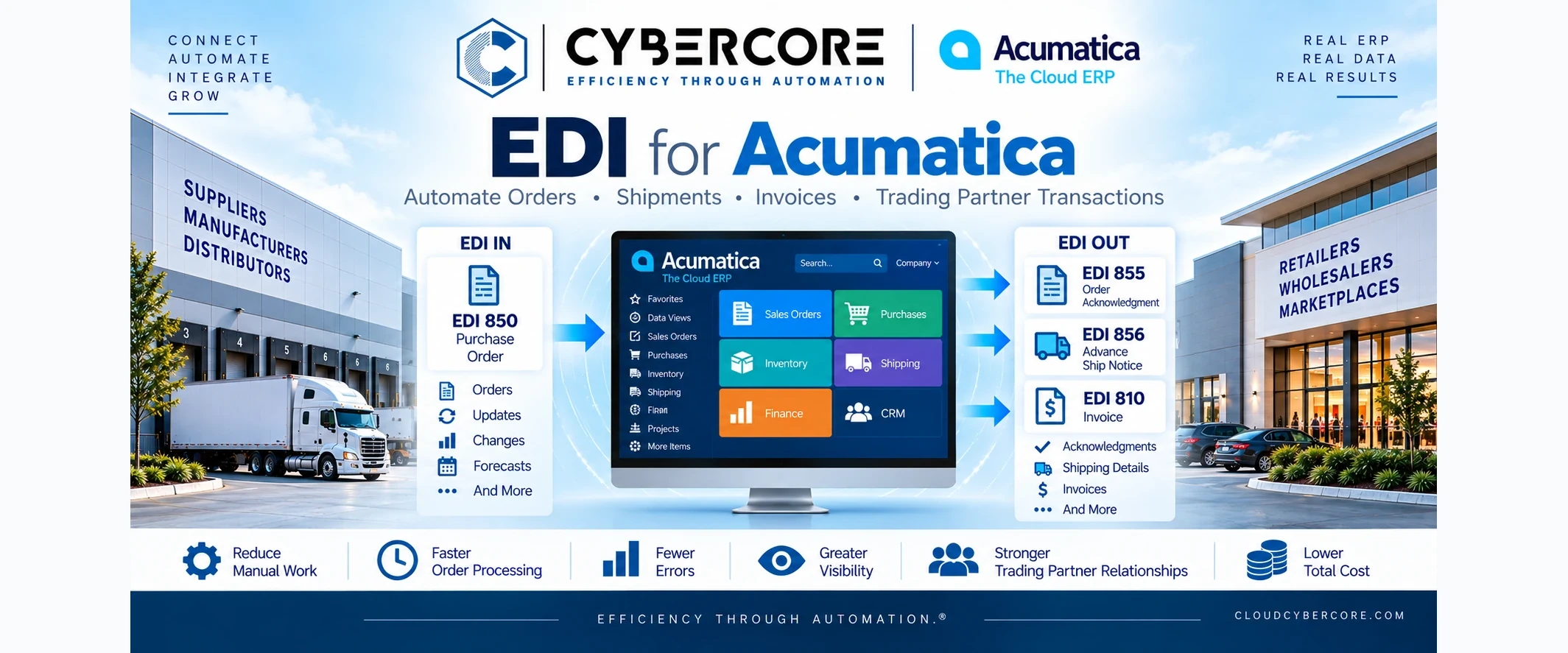
When EDI is properly integrated with Acumatica, incoming purchase orders can become sales orders, acknowledgments can be returned automatically, shipment information can generate advance ship notices, and invoices can flow back to the trading partner—all as part of the normal ERP workflow.
But before looking at the integration, it helps to understand exactly what EDI is and why businesses use it.
What Is EDI?
EDI (Electronic Data Interchange) is a standardized way for businesses to exchange documents electronically from one computer system to another.
Instead of a customer emailing a purchase order that someone must manually enter into Acumatica, EDI allows that purchase order to be transmitted electronically, translated into the required format, validated, and processed by the ERP system.
The same concept works in the other direction. Once an order is accepted, shipped, or invoiced in Acumatica, the appropriate electronic document can be generated and sent back to the trading partner.
EDI has been around for decades, but it remains critical to modern supply chains because it allows businesses to process large volumes of transactions quickly and consistently while reducing manual data entry.
The important distinction is that EDI itself is only the method of exchanging standardized business documents. The real value comes when EDI is integrated into the ERP workflows that actually process those transactions.
Who Needs EDI?
EDI is especially common for businesses that sell to larger organizations with established purchasing and supply-chain requirements. In many cases, the decision to use EDI isn't really a decision at all—a major customer or trading partner requires it as a condition of doing business.
Common examples include:
- Manufacturers supplying products or components to larger companies
- Distributors and wholesalers processing high volumes of customer orders
- Consumer product companies selling through major retailers
- Medical device and healthcare suppliers working with hospitals, distributors, and healthcare organizations
- Automotive and industrial suppliers participating in complex supply chains
- Food and beverage suppliers selling through grocery, retail, and distribution networks
- Ecommerce and omnichannel businesses that need orders, inventory, fulfillment, and shipping information synchronized across systems
The need often becomes obvious when order volume increases. Manually downloading an order from an EDI portal and re-entering it into Acumatica may be manageable at five orders a day. At 100, 500, or thousands of transactions, the same process can become expensive, slow, and prone to errors.
The goal of integrated EDI is to remove that unnecessary manual work while keeping Acumatica at the center of the business process.
Common EDI Documents: 850, 855, 856 and 810
EDI transactions are identified by standardized document numbers. There are many EDI transaction types, but businesses using Acumatica for order processing will commonly encounter a few key documents:
- EDI 850 — Purchase Order: Sent by the customer or trading partner to place an order. With a properly integrated system, the 850 can be validated and used to create the corresponding sales order in Acumatica without someone rekeying it.
- EDI 855 — Purchase Order Acknowledgment: Sent back to the customer to confirm that the order has been received and indicate whether it has been accepted, changed, or rejected.
- EDI 856 — Advance Ship Notice (ASN): Sent when an order ships. It can communicate shipment details such as items, quantities, cartons, tracking information, and other information required by the trading partner.
- EDI 810 — Invoice: The electronic invoice sent to the customer after the appropriate billing process occurs in Acumatica.
Other transactions may also be required. For example, an EDI 846 Inventory Inquiry/Advice can communicate inventory availability, while other document types support purchase-order changes, receiving, transportation, payments, and additional supply-chain processes.
The exact requirements vary by trading partner. Walmart, Amazon, a large distributor, or a healthcare organization may each have different document requirements, validation rules, data mappings, and business processes—even when they use the same EDI transaction types.
How Does Integrated EDI Work with Acumatica?
Consider a distributor receiving an EDI order from a major retail customer. With an integrated EDI workflow, the process can look something like this:
- The customer sends an EDI 850 Purchase Order. The EDI platform receives the document and translates the customer's data into the format required by the integration.
- The order is validated and created in Acumatica. Customer information, ship-to location, item numbers, quantities, pricing, requested dates, and other required data can be validated before the sales order is created.
- Acumatica becomes the system of record. The order moves through the company's normal workflow for inventory allocation, fulfillment, approvals, warehouse processing, and shipping.
- An EDI 855 Purchase Order Acknowledgment is returned. The customer receives confirmation of the order and any applicable changes or exceptions.
- The warehouse fulfills and ships the order. Once shipment information is available in Acumatica, the integration can use it to generate the required EDI 856 Advance Ship Notice.
- The customer receives the EDI 856 ASN. Shipment, carton, tracking, and other required fulfillment information is communicated electronically.
- Acumatica generates the invoice. The appropriate invoice information can then be transformed into an EDI 810 Invoice and transmitted back to the customer.
Instead of employees repeatedly moving information between an EDI portal and the ERP, the EDI transactions become part of the normal Acumatica workflow.
That is where integrated EDI creates real value: less manual entry, fewer opportunities for errors, faster transaction processing, and better visibility from order through shipment and invoicing.
Why EDI Integration Is More Than Just Connecting Two Systems
An EDI integration can look straightforward on paper: receive a document, translate it, and send the information to Acumatica. In practice, the difficult part is usually understanding and correctly automating the business rules behind each transaction.
Every trading partner can have different requirements. A successful integration may need to account for:
- Customer and ship-to mapping
- Trading-partner item numbers and cross-references
- Units of measure and packaging requirements
- Pricing and discount rules
- Warehouse and fulfillment requirements
- Lot or serial number information
- Carrier, routing, and shipping requirements
- ASN carton and packaging details
- Required fields and partner-specific validation rules
- Order changes, cancellations, backorders, and exceptions
- Error handling, notifications, and transaction monitoring
This is why EDI expertise alone isn't enough. The team building the integration also needs to understand how orders, inventory, shipments, invoices, customers, and warehouses actually work inside the ERP system.
A technically successful EDI transmission isn't very useful if it creates the wrong order, uses the wrong customer location, maps the wrong inventory item, or fails when a real-world exception occurs.
The goal isn't simply to make EDI communicate with Acumatica. The goal is to make EDI work correctly as part of the company's actual business process.
Standalone EDI vs. Integrated EDI
Not every company starts with fully integrated EDI. A business may initially use an EDI provider's portal to receive orders, print documents, enter information into Acumatica manually, and then return the required documents through the portal.
That can work when transaction volume is low. The problem is that the EDI system and ERP remain disconnected, so employees become the integration between the two systems.
As volume grows, integrated EDI can eliminate much of that repetitive work.
With standalone EDI, employees may need to:
- Review incoming transactions in an external EDI portal
- Manually create or update orders in Acumatica
- Re-enter shipment and tracking information
- Prepare acknowledgments and ASNs
- Enter invoice information back into the EDI system
- Research discrepancies between the two systems
With integrated EDI, Acumatica and the EDI platform can exchange that information automatically based on defined business rules.
That doesn't mean every transaction should operate without human oversight. Exceptions, unusual orders, pricing discrepancies, inventory issues, or failed validations may still require someone to review and resolve them.
The objective is to automate the routine transactions and bring the exceptions to the right person's attention—instead of making employees manually process every transaction.
What Should You Look for in an Acumatica EDI Partner?
An EDI project touches more than technology. It can affect sales orders, inventory, warehouse operations, shipping, invoicing, customer relationships, and ultimately cash flow.
That's why the right partner should understand both EDI and Acumatica, as well as the business processes connecting them.
When evaluating an EDI integration partner, look for experience with:
- Acumatica ERP and its underlying business processes
- EDI standards, transaction sets, and trading-partner requirements
- APIs, web services, data mapping, and system integration
- Sales order and purchase order workflows
- Inventory, warehouse, shipping, and fulfillment processes
- Customer and inventory cross-references
- Testing and certification with trading partners
- Exception handling and transaction monitoring
- Ongoing support as trading-partner requirements change
The initial integration is only part of the lifecycle. Customers introduce new requirements, retailers update specifications, new trading partners are added, and businesses change their own processes over time.
A good EDI integration should be designed not only to work on day one, but to remain manageable as the business grows and changes.
Why CyberCore for Acumatica EDI?
At CyberCore, EDI isn't treated as a standalone technology project. We approach it as part of the larger ERP and business process.
Our team brings decades of ERP experience, along with more than a decade working on the Acumatica platform as an Acumatica Gold Partner. That experience matters because a successful EDI implementation requires understanding what happens before and after the electronic document is exchanged.
We work with businesses to integrate EDI into the processes they already depend on in Acumatica, including:
- Sales order automation
- Purchase order processing
- Inventory and warehouse workflows
- Shipping and fulfillment
- Customer and item cross-references
- Invoices and financial processes
- Trading-partner-specific requirements
- Custom integrations and business rules
- Exception handling and transaction monitoring
CyberCore can work with existing EDI platforms and providers while handling the Acumatica integration, mappings, customizations, workflows, testing, and ongoing support required to make the complete process work together.
For us, the objective isn't simply to say that an EDI document was successfully transmitted. The objective is to make sure the transaction reaches Acumatica correctly, follows the right business process, and ultimately reduces work for the people running the business.
Before You Choose an EDI Solution, Talk to CyberCore
EDI doesn't have to become another expensive monthly technology bill.
Many EDI solutions carry significant recurring fees based on trading partners, transaction volume, document types, or other usage. Depending on the solution and transaction volume, those costs can add up to thousands of dollars per month.
CyberCore takes a different approach. Because we understand both EDI and Acumatica, we can look at the complete requirement—including your trading partners, transaction volume, document types, Acumatica workflows, and existing technology—and help design an approach that makes sense operationally and financially.
For some businesses, that can mean substantial monthly savings compared with higher-cost EDI platforms and service models, while still delivering the automation and integration they need.
If you're considering a new EDI solution, adding a trading partner, replacing an expensive existing service, or trying to integrate EDI properly with Acumatica, talk to CyberCore before you make the decision.
We may be able to save your business a significant amount of money every month while giving you a better-integrated Acumatica EDI solution.
Call CyberCore at (888) 521-1801 (ext.119) or contact us to review your EDI requirements.
Related reading
.webp)