CyberCore EDI for Acumatica
Integrated EDI that turns your trading partners' purchase orders into Acumatica sales orders, then sends acknowledgments, ship notices and invoices back as part of your normal workflow. Once it's set up, there are no per-document charges.
Trading-partner orders become Acumatica sales orders; acknowledgments, ship notices and invoices go back automatically. No per-document charges once set up.
Our average client has saved thousands of dollars per month.
EDI doesn't have to become another expensive monthly technology bill. Talk to us before you choose, renew or add a trading partner.

Why businesses choose CyberCore EDI for Acumatica
Supports all EDI document types, with no per-document charges once it's set up.

Less manual work
Orders, acknowledgments, ship notices and invoices move without rekeying.

Fewer errors
Validation, mappings and cross-references catch problems before they reach your customer.

Faster order processing
Orders reach Acumatica and your warehouse sooner.

Greater visibility
Follow each transaction from order through shipment and invoicing in one system.

Stronger trading-partner relationships
Documents arrive the way each partner requires them.

Lower total cost
No per-document charges once it's set up, so volume growth doesn't drive up your EDI bill.
From purchase order to invoice, inside Acumatica
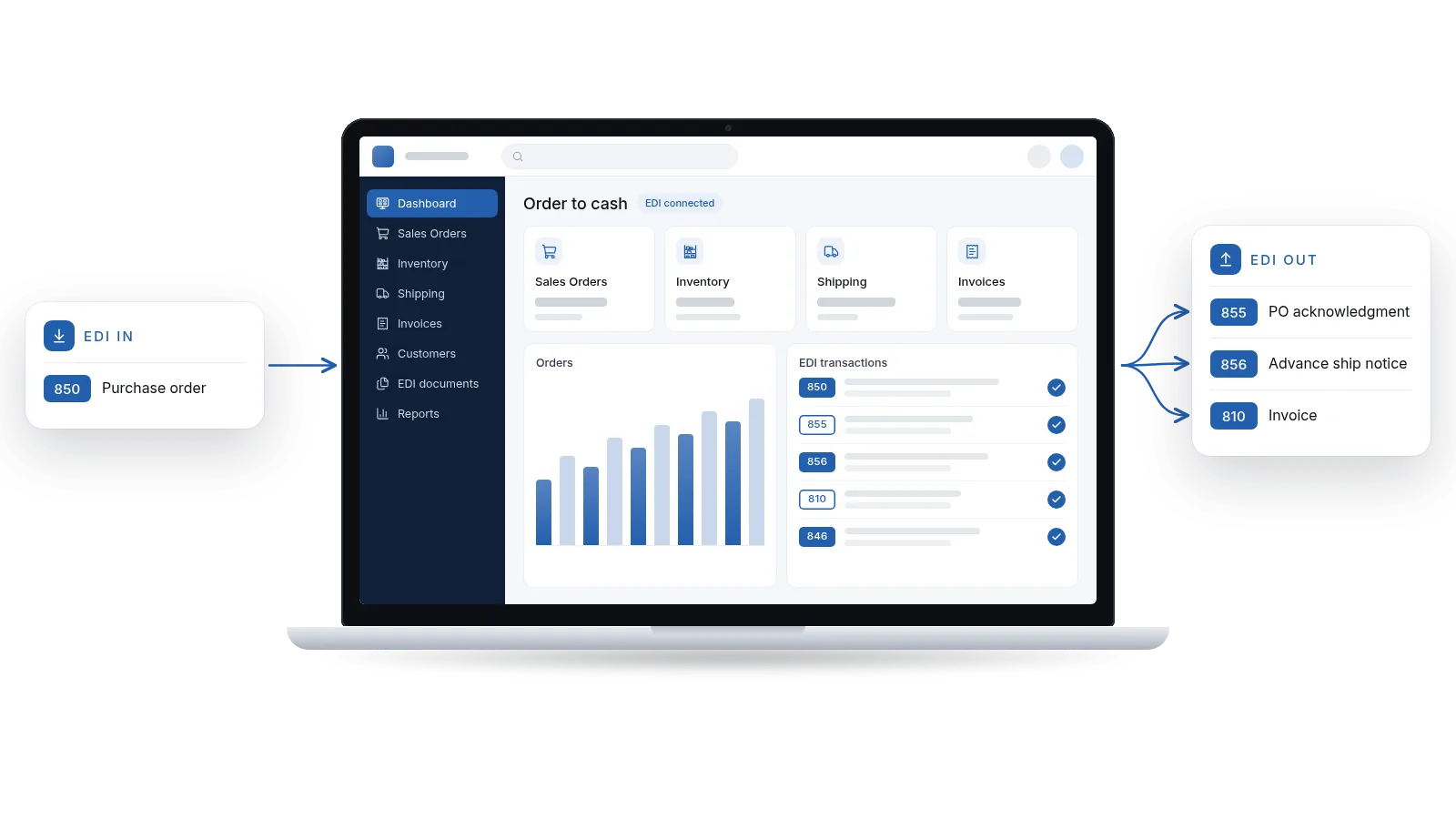
CyberCore EDI for Acumatica connects each EDI document to the Acumatica transaction behind it. Here's the typical order flow:
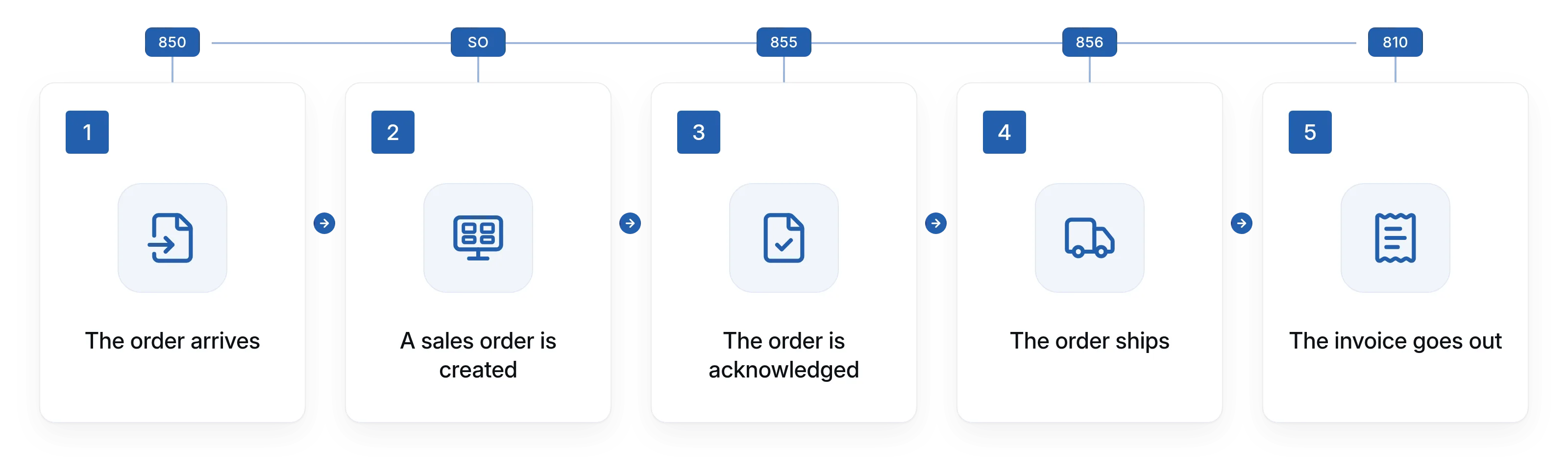
The order arrives
Your customer sends an EDI 850 purchase order, which is translated for the integration.
A sales order is created
Customer, ship-to, items, quantities, pricing and dates are validated, then the sales order is created in Acumatica.
The order is acknowledged
An EDI 855 confirms the order and any changes or exceptions.
The order ships
Your normal fulfillment runs in Acumatica, and shipment data generates the EDI 856 advance ship notice.
The invoice goes out
The Acumatica invoice becomes an EDI 810 and is sent back to your customer.
What CyberCore EDI for Acumatica covers
It supports all EDI document types, and each one is configured to your trading partner's requirements.

850 purchase orders
Incoming orders are validated and created as Acumatica sales orders without rekeying.

855 PO acknowledgments
Confirms whether each order was accepted, changed or rejected.

856 advance ship notices
Sends items, quantities, cartons, tracking and other required shipment details.

810 invoices
Turns the Acumatica invoice into the EDI invoice your customer expects.

846 inventory
Shares inventory availability with trading partners that require it.

Every other document type
Supports every other EDI document your trading partners require. If they need it, we support it.

Trading-partner configuration
Customer and ship-to mappings, required fields and validation rules set up partner by partner.

Item cross-references
Matches trading-partner item numbers, units of measure and packaging to your Acumatica items.

Exception handling and monitoring
Routine transactions run automatically, and exceptions are brought to the right person's attention.
Supported EDI documents
CyberCore EDI for Acumatica supports all EDI document types. Here are the ones trading partners ask for most often.
850
Purchase Order
855
PO Acknowledgment
856
Advance Ship Notice
810
Invoice
846
Inventory
860
PO Change
865
PO Change Acknowledgment
820
Payment/Remittance
940
Warehouse Shipping Order
945
Warehouse Shipping Advice
997
Functional Acknowledgment
812
Credit/Debit Adjustment
852
Product Activity
753/754
Routing Request/Instructions
...and every other EDI document your trading partners require. If they need it, we support it.
Our average client has saved thousands of dollars per month
Many EDI solutions charge recurring fees based on trading partners, transaction volume, document types or other usage, and those costs can add up to thousands of dollars per month. CyberCore EDI for Acumatica works differently: once it's set up, you don't pay per-transaction or per-document charges.
That means growing order volume doesn't automatically grow your EDI bill. EDI doesn't have to become another expensive monthly technology bill.

No per-document fees
once your integration is set up

No per-transaction charges
as your volume grows

Scoped to your requirements
we look at your trading partners, transaction volume, document types, Acumatica workflows and existing technology
Every business is different, so we don't publish a price list. On a strategy call, we'll review your requirements and show you where the savings could come from in your situation. Your results will depend on your trading partners, transaction volume and current setup.
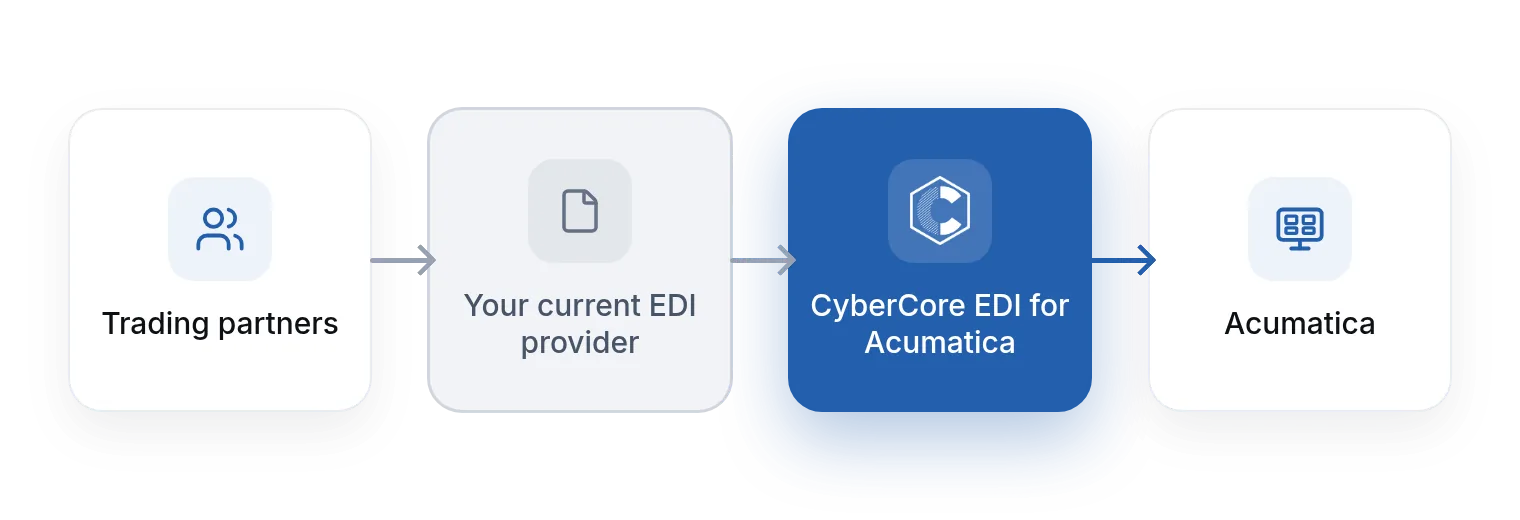
Replace your current EDI provider, or keep it
You don't have to start over. CyberCore EDI for Acumatica fits either path.

Replace your current EDI provider
Run your EDI documents and trading partners on CyberCore EDI for Acumatica instead, with no per-document charges once it's set up.

Work alongside your current EDI provider
Keep your current EDI provider in place while we handle the Acumatica integration, mappings, workflows, testing and ongoing support. Because CyberCore EDI for Acumatica has no per-document charges, you can still save money.
Not sure which path makes sense? That depends on your trading partners, volume and current contract. We'll walk through both options with you.
EDI as part of your business process, not a side project
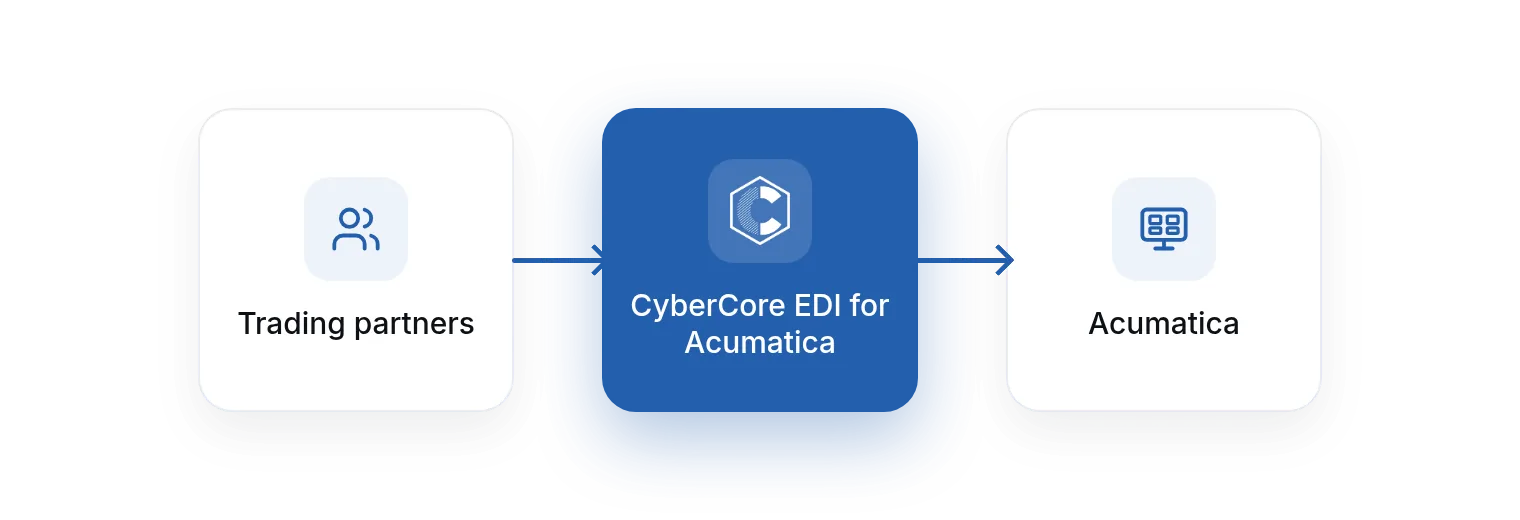
At CyberCore, EDI isn't treated as a standalone technology project. We approach it as part of the larger ERP and business process. With CyberCore EDI for Acumatica, Acumatica stays the system of record, and orders move through the workflows you already use for allocation, approvals, warehouse processing, shipping and invoicing.
A technically successful EDI transmission isn't very useful if it creates the wrong order, uses the wrong customer location or maps the wrong item. That's why our team works on both sides: the EDI documents and what happens in Acumatica before and after they're exchanged.
- Sales order automation
- Purchase order processing
- Inventory and warehouse workflows
- Shipping and fulfillment
- Invoices and financial processes
- Custom business rules for each trading partner
Proven in day-to-day operations
CyberCore EDI for Acumatica isn't new. It has been running at several large clients for years, processing their trading-partner transactions inside Acumatica.

Running for years
In use at several large clients for several years.

Acumatica Gold Certified Partner
Built and supported by an Acumatica Gold Certified partner.

More than a decade on Acumatica
Our team brings 35+ years in ERP and more than a decade working on the Acumatica platform.
Built for businesses that trade by EDI
EDI is especially common when you sell to larger organizations with established purchasing and supply-chain requirements. CyberCore EDI for Acumatica is a fit for:
- Manufacturers supplying products or components to larger companies
- Distributors and wholesalers processing high volumes of customer orders
- Consumer product companies selling through major retailers
- Medical device and healthcare suppliers working with hospitals, distributors and healthcare organizations
- Automotive and industrial suppliers in complex supply chains
- Food and beverage suppliers selling through grocery, retail and distribution networks
- Ecommerce and multi-channel businesses that need orders, inventory, fulfillment and shipping synchronized across systems
Frequently asked questions
Which EDI documents do you support?
All of them. CyberCore EDI for Acumatica supports every EDI document type, including the 850 purchase order, 855 PO acknowledgment, 856 advance ship notice, 810 invoice, 846 inventory, 860 PO change, 865 PO change acknowledgment, 820 payment/remittance, 940 warehouse shipping order, 945 warehouse shipping advice, 997 functional acknowledgment, 812 credit/debit adjustment, 852 product activity and 753/754 routing request/instructions. Each one is configured to that trading partner's requirements. If they need it, we support it.
Do you charge per document or per transaction?
No. Once it's set up, you don't pay per-transaction or per-document charges, and our average client has saved thousands of dollars per month. Setup is scoped to your trading partners and workflows, and we'll review that with you on a strategy call.
Do I have to replace my current EDI provider?
No. You can replace your current EDI provider or keep it and have CyberCore EDI for Acumatica work alongside it. Either way, there are no per-document charges on our side.
Will every order process without anyone looking at it?
Routine transactions are automated. Exceptions such as unusual orders, pricing discrepancies, inventory issues or failed validations are brought to the right person so they can be reviewed and resolved.
What if a trading partner changes its requirements, or I add a new one?
That's expected. Retailers update specifications and businesses add trading partners over time, and our ongoing support covers those changes. More on how it works →
Is it proven?
Yes. CyberCore EDI for Acumatica has been running at several large clients for years.
How long does setup take, and what does it cost?
It depends on your trading partners, document types, volume and Acumatica workflows. Book a Call or call (888) 521-1801, and we'll review your requirements.
Talk to us before you choose an EDI solution
Considering a new EDI solution, adding a trading partner or replacing an expensive service? Book a free 30-minute strategy call and we'll review your EDI requirements and Acumatica workflows, all without any commitments.


.webp)